Google Interview Questions... Very tough ones!!!
Monday, 21 May 2012

Thursday, 17 May 2012
Error Starting Weblogic Admin Server: Could not reserve enough space for object heap
The first time that I run my weblogic admin server after installing and configuring oracle soa in weblogic 10.3.2, I encountered the following error:

I resolved this by creating a new environment variable called EXTRA_JAVA_PROPERTIES with the following value "-Xms512m -Xmx512m".
 From the JDeveloper 11g Release Notes:
Could not reserve enough space for object heap.
Could not create the Java virtual machine.

I resolved this by creating a new environment variable called EXTRA_JAVA_PROPERTIES with the following value "-Xms512m -Xmx512m".
 From the JDeveloper 11g Release Notes:
Running applications with limited free memory (7343786)
Under certain circumstances, if you do not have enough free memory available, you may receive an error when running an application:
Error occurred during initialization of VM
Could not reserve enough space for object heap
Normally you would resolve this by adding -Xms and -Xmx arguments to the project's Run/Debug profile. However, there are existing entries for these settings in the WebLogic startup that will override the project's settings. The proper way to resolve this error is to add EXTRA_JAVA_PROPERTIES to your environment, as follows:
On Linux
setenv EXTRA_JAVA_PROPERTIES "-Xms512m -Xmx512m"
On Windows
set EXTRA_JAVA_PROPERTIES="-Xms512m -Xmx512m"
Important update to this post!
"-Xmx512" is not sufficient to run and test an application in a SOA server, because it would be incredibly slow. If you encounter the above issue using the default config of "-Xmx1024m", then try to decrease the number until it will work. There is no hard rule, you could try "-Xmx1000m" for instance. If it still doesn't work, then try decreasing the number again.
*****************************************
*****************************************
Oracle SOA Suite 11g Patch Set 2, installation steps
For this new installation i used the next set of installations
- Oracle Database 11g Release 2, Enterprise Edition (download)
- Repository Creation Utility (11.1.1.3.0) (download)
- WebLogic Server (10.3.3) (download Oracle WebLogic Server 11gR1 (10.3.3) + Coherence + OEPE – Package Installer)
- SOA Suite
- SOA Suite 11.1.1.2.0 (download SOA Suite (11.1.1.2.0))
- SOA Suite 11.1.1.3.0 (patch) (download SOA Suite (11.1.1.3.0))
- JDeveloper 11.1.1.3.0 (download)
- SOA Extension for JDeveloper (download)
Loopback adapter
Optional installation of the Microsoft Loopback adapter (in case of dhcp)
Oracle Database 11g Release 2, Enterprise Edition
Follow the installation guide
*Note
Install the new db and update a few system parameters, otherwise the installation of the SOA Suite will fail
Install the new db and update a few system parameters, otherwise the installation of the SOA Suite will fail
- alter system set processes=500 scope=spfile;
- alter system set open_cursors=500 scope=spfile;
Repository Creation Utility
Run: rcuHome/bin/rcu.bat
Select the components you need and finish installation


Select the components you need and finish installation
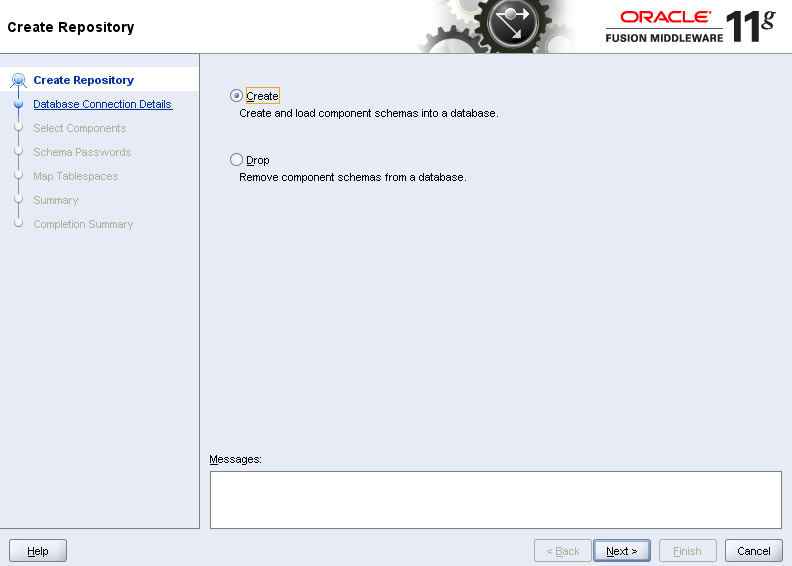


WebLogic Server
Run: wls1033_oepe111150_win32.exe
Create a new Middleware Home


Create a new Middleware Home


SOA Suite
Oracle SOA Suite patchset1 was a fullblown new release. For the installation of the new patchset 2, we first need to install the patchset1 release.
Without it you will face the next message

Without it you will face the next message

Run: Disk1/setup.exe (soa_11.1.1.2.0)
Select the Middleware Home we just created with the installation of Patchset 1


Select the Middleware Home we just created with the installation of Patchset 1


Run: Disk1/setup.exe (soa_11.1.1.3.0)


Configure Oracle SOA Suite
Run: middleware/wlserver_10.3/common/bin/config.exe
We’ll create a new weblogic domain for the soasuite components. Select the components you want to get installed in the domain, configurate database-settings and go.


We’ll create a new weblogic domain for the soasuite components. Select the components you want to get installed in the domain, configurate database-settings and go.


Install Oracle Composite Editor for Jdeveloper
I use the manual install of the extension, but you can also update it fron within JDeveloper itself.
Help > Check for Updates > Source > Install From Local File, and Browse to the downloaded zip file, and your done
Help > Check for Updates > Source > Install From Local File, and Browse to the downloaded zip file, and your done
Subscribe to:
Comments (Atom)