Wednesday, 3 April 2013

ORABPEL-02182 Exception

Problem:
ORABPEL-02182

JTA transaction is not present or the transaction is not in active state.
The current JTA transaction is not present or it is not in active state when processing activity or instance "4260005-BpInv5-BpTry7.13-1". Please consult your administrator regarding this error.

Some Thoughts:
You can encounter this error if response time of adapter is greater than the predefined waiting time for a BPEL instance.As a result process does not get dehydrated on time and fails by throwing this error.

Solution:
A better solution for above problem should be to increase the transaction-timeout values in order to make the BPEL instance to wait more time until a response returns from the adapter.

Following are the steps you should follow to acheive the result:

1) Stop SOA Server

2) Goto SOA_Home\j2ee\config\transaction-manager.xml, serach for transaction-timeout and set transaction-timeout for e.g. to 7200 or more (default value is 30).

3) Goto SOA_Home\j2ee\application-deployments\orabpel\ejb_ob_engine\orion-ejb-jar.xml and set all transaction-timeout to 3600 or more. The value passed here should be always less than the value which is mentioned in step 2.

4) Goto SOA_Home\bpel\domains\config\domain.xml and set syncMaxWaitTime to 240 or more. The value passed here should be always less than the value which is mentioned in step 3. (Default value is 45)

5) Start SOA server and run the process again. Process should work fine.

Thursday, 10 January 2013

DB Adapter polling tricks..!!

The commonly used polling strategies with Oracle DB adapter are:

1. DeletePollingStrategy : This is simplest where we read all possible rows from table and delete them afterwards to ensure that they are only read once.

2. LogicalDeletePollingStrategy : This is a non-intrusive polling mechanism where we update a status column to mark records as read rather than deleting them. This uses 2 SQLs -- one for polling/reading the records and another after-read SQL to update/mark the records as read.

3. LastReadId or SequencingPollingStrategy : This takes help of an external sequencing/helper table. This assumes that all new rows are inserted with an increasing key so that when selected only records with key greater than the highest key previously processed are fetched. This last highest key is stored in the helper table.

TopLink is the technology on which the DbAdapter is built and the DBAdapter UI generates some files especially toplink metadata or -mappings.xml file which can be hand edited to extend the polling mechanisms.

There maybe cases where you would like to use logical delete with custom SQLs instead of Toplink generated SQL to poll DB tables.In order to achieve this please make sure below steps are followed:

1. Pure SQL will not be executed by Toplink if you choose the second option (Logical Delete) as the After Read Strategy in Adapter Configuration Wizard.
2. To make Pure SQL work with Logical Delete Strategy, you must choose the first option (Delete the rowsas the After Read Strategy in Adapter Configuration Wizard, then edit the toplink project directly by adding two custom SQLs, one for polling, the other for after reading operations.
3. For editing the toplink project open the -or-mappings.xml outside of Jdeveloper (the file is write protected) and add below entries:
?
1
2
3
<toplink:call xsi:type="toplink:sql-call">
<toplink:sql>Enter your SQL here</toplink:sql>
</toplink:call>
When adding the <toplink:call> element, it must be under <opm:query>. Also immediately after <opm:queries>and before <opm:querying> add this element:
?
1
2
3
4
5
<toplink:delete-query xsi:type="toplink:delete-object-query">
<toplink:call xsi:type="toplink:sql-call">
<toplink:sql>Enter your After read SQL here</toplink:sql>
</toplink:call>
</toplink:delete-query>
There maybe cases where you would like to control the number of DB records which are polled at a time. The DB adapter wizard gives several configurable properties which can control this.

1. Polling frequency is the interval at which the DB adapter activation agent polls the new records.

2. Database Rows per Transaction (default value of 10) controls the number of records which are read at a time. For eg. if there are 1000 records to be read and we set the Database Rows per Transaction=10 , at the start of the polling interval the entire work is divided into 1000/10=100 transaction units and completes sequentially till all are processed. This property resolves to MaxTransactionSize in the jca file.

3. If we enable the distributed polling checkbox and set the MaxTransactionSize the behaviour changes. Here the entire work is divided into 100 transaction units but each unit is processed in a single polling interval i.e 1st polling interval 10 records are processed, rest 990 will be processed in subsequent intervals.

Thursday, 17 May 2012

Error Starting Weblogic Admin Server: Could not reserve enough space for object heap

The first time that I run my weblogic admin server after installing and configuring oracle soa in weblogic 10.3.2, I encountered the following error:
Could not reserve enough space for object heap.
Could not create the Java virtual machine.

I resolved this by creating a new environment variable called EXTRA_JAVA_PROPERTIES with the following value "-Xms512m -Xmx512m". 
From the JDeveloper 11g Release Notes:

Running applications with limited free memory (7343786)

Under certain circumstances, if you do not have enough free memory available, you may receive an error when running an application:

Error occurred during initialization of VM
Could not reserve enough space for object heap

Normally you would resolve this by adding -Xms and -Xmx arguments to the project's Run/Debug profile. However, there are existing entries for these settings in the WebLogic startup that will override the project's settings. The proper way to resolve this error is to add EXTRA_JAVA_PROPERTIES to your environment, as follows:

On Linux
setenv EXTRA_JAVA_PROPERTIES "-Xms512m -Xmx512m"

On Windows
set EXTRA_JAVA_PROPERTIES="-Xms512m -Xmx512m"

Important update to this post!

"-Xmx512" is not sufficient to run and test an application in a SOA server, because it would be incredibly slow. If you encounter the above issue using the default config of "-Xmx1024m", then try to decrease the number until it will work. There is no hard rule, you could try "-Xmx1000m" for instance. If it still doesn't work, then try decreasing the number again.
*****************************************

Oracle SOA Suite 11g Patch Set 2, installation steps


For this new installation i used the next set of installations

Loopback adapter

Optional installation of the Microsoft Loopback adapter (in case of dhcp)

Oracle Database 11g Release 2, Enterprise Edition

Follow the installation guide
*Note
Install the new db and update a few system parameters, otherwise the installation of the SOA Suite will fail
  • alter system set processes=500 scope=spfile;
  • alter system set open_cursors=500 scope=spfile;

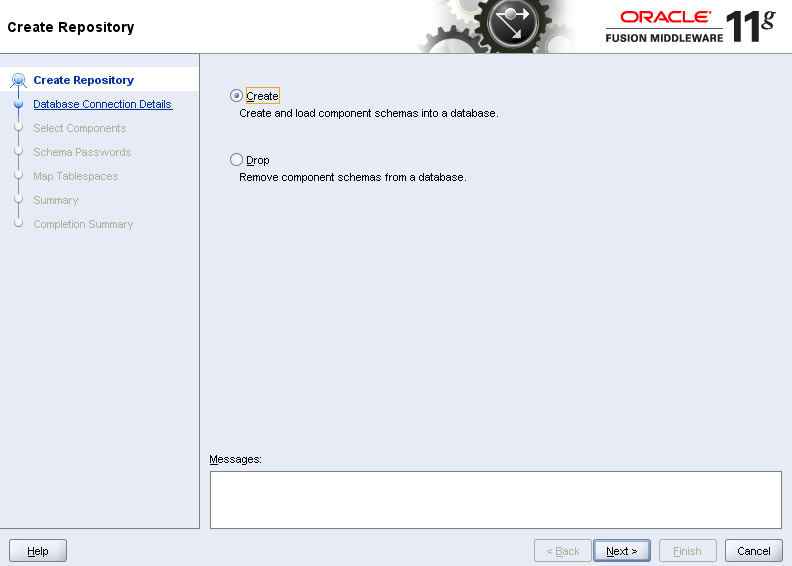
Repository Creation Utility

Run: rcuHome/bin/rcu.bat
Select the components you need and finish installation


WebLogic Server

Run: wls1033_oepe111150_win32.exe
Create a new Middleware Home


SOA Suite

Oracle SOA Suite patchset1 was a fullblown new release. For the installation of the new patchset 2, we first need to install the patchset1 release.
Without it you will face the next message ;)
Run: Disk1/setup.exe (soa_11.1.1.2.0)
Select the Middleware Home we just created with the installation of Patchset 1


Run: Disk1/setup.exe (soa_11.1.1.3.0)


Configure Oracle SOA Suite

Run: middleware/wlserver_10.3/common/bin/config.exe
We’ll create a new weblogic domain for the soasuite components. Select the components you want to get installed in the domain, configurate database-settings and go.


Install Oracle Composite Editor for Jdeveloper

I use the manual install of the extension, but you can also update it fron within JDeveloper itself.
Help > Check for Updates > Source > Install From Local File, and Browse to the downloaded zip file, and your done